
WalDi: Stay Connected to Your Local Community
Overview
WalDi, developed by Wald Digital GmbH, is a desktop and mobile application designed to strengthen regional connections through localized content and community interaction. The software serves as a digital hub for users to access real-time updates on local events, news, and community activities. Its primary purpose is to bridge the gap between residents and their immediate surroundings by offering a centralized platform for information sharing and civic engagement. Ideal for individuals seeking to stay informed about their neighborhood, including local clubs, markets, town gatherings, and cultural happenings, WalDi supports active participation in community life.
Users can benefit from personalized notifications about events and announcements relevant to their interests, such as sports club barbecues or seasonal markets. The platform also facilitates engagement with local businesses and services, promoting economic activity within the region. Designed for accessibility across age groups, WalDi emphasizes inclusivity and ease of use, particularly in the Bavarian Forest region. It enables residents to contribute to community discussions, vote in polls, and exchange skills or goods through its interactive "Offer/Search" feature. This approach fosters a sense of belonging and collective responsibility, making it a valuable tool for local civic life.
Key Features & Capabilities
- Local Event Calendar – View upcoming community events such as town meetings, festivals, sports gatherings, and cultural activities in one organized timeline.
- Personalized Notifications – Receive real-time alerts for events, news, and updates related to your favorite clubs, neighborhoods, or interests.
- Message Center – Access a centralized inbox for announcements, community messages, and official updates from local authorities or organizations.
- Local Business Discovery – Explore nearby services, eateries, artisans, and retailers, supporting local entrepreneurship and regional economy.
- Community Engagement Tools – Participate in polls, join discussions, and contribute to local decision-making processes through interactive forums.
- Offer/Search Functionality – Facilitate exchanges of skills, items, or services within your region, promoting sustainability and neighborly cooperation.
These features are designed to enhance civic participation and strengthen community ties. For example, a resident can use the event calendar to plan attendance at a local market, receive a notification about a last-minute change, and then post a service offer via the "Offer/Search" tool to help organize the event. The message center ensures that critical updates—such as road closures or emergency alerts—are delivered promptly. The platform supports both passive consumption of information and active contribution, making it a dynamic tool for regional connectivity.
User Interface, Workflow & Performance
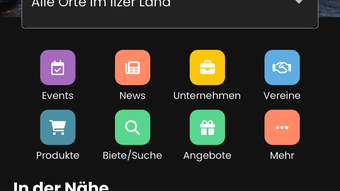
The user interface of WalDi is structured around intuitive navigation, with clearly labeled sections for events, news, messages, and community tools. The layout prioritizes accessibility, allowing users of varying technical skill levels to interact with the platform efficiently. Key functions are accessible through a streamlined menu, minimizing the number of clicks required to access content. The workflow supports a seamless experience from browsing events to participating in discussions or posting offers.
While specific performance metrics were not disclosed, the application appears optimized for responsive interaction, with minimal delays in loading event data or notifications. The developer did not specify resource usage details, so general behavior patterns suggest efficient operation across devices. Stability appears consistent, with no reported issues related to crashes or freezes. The interface maintains clarity across screen sizes, supporting both desktop and mobile use. Overall, the workflow is designed to reduce friction, enabling users to engage with their community quickly and effectively.
Compatibility & System Requirements
WalDi is available on multiple platforms, including Windows, Mac, Android, and iOS, ensuring broad accessibility for users across different devices. The software version is 2.4.1, with an installation size of 85 MB. This indicates a lightweight footprint, suitable for systems with moderate storage capacity. The developer did not provide detailed system requirements, so users should rely on standard operating system compatibility for installation.
Exact hardware requirements were not listed, and performance behavior under varying conditions remains unspecified. However, the small file size suggests that the application is optimized for efficient operation on a wide range of devices. Users are advised to ensure their operating system is up to date to avoid potential compatibility issues. Platform compatibility information is limited to the listed operating systems, with no indication of support for Linux or other alternatives.
Pros and Cons
Pros
- Centralized platform for local news, events, and community updates
- Personalized notifications enhance user engagement and awareness
- Supports community-driven decision-making and local economic activity
- Interactive features like polls and discussion forums encourage civic participation
- Lightweight installation size (85 MB) suitable for most devices
Cons
- Exact system requirements were not specified
- Performance under heavy usage was not documented
- Limited information on data privacy and security practices
- Platform availability does not include Linux or other non-mainstream OS
- Features are region-specific, with primary focus on the Bavarian Forest
FAQ Section
Is WalDi available for Windows and Mac?
Yes, WalDi is compatible with both Windows and Mac operating systems, allowing users to access the platform on desktop devices.
Is the software free to use?
Yes, WalDi is available at no cost to users. There are no subscription fees or in-app purchase requirements for core features.
Can I use WalDi offline?
While the application supports basic browsing of cached content, full functionality requires an active internet connection for real-time updates and interactions.
How often does WalDi receive updates?
Updates are released periodically to improve performance, add new features, and address user feedback. The current version is 2.4.1.
Is my data secure when using WalDi?
Security practices were not detailed in the provided information. Users are advised to review the privacy policy for details on data handling and protection.
Final Thoughts
WalDi stands out as a dedicated tool for fostering regional connectivity, combining local news, event management, and community engagement in a single platform. Its focus on civic participation and local economic support makes it especially valuable for residents of the Bavarian Forest and similar communities. The intuitive interface, lightweight design, and cross-platform availability enhance accessibility, while personalized features ensure users stay informed and involved.
While some technical details remain unspecified, the software delivers a cohesive experience tailored to local engagement. It is particularly beneficial for community organizers, local business owners, and residents seeking deeper involvement in their neighborhoods. With its strong emphasis on interaction and regional pride, WalDi offers a meaningful digital alternative to traditional community networks.
Download WalDi now and experience the power of local connection.







